Introduction
If your e-commerce website has multiple URLs for the same product, you could be silently killing your rankings—without even realizing it.
Many store owners rely on canonical tags when they should be using 301 redirects. The result? Wasted crawl budget, diluted authority, and lower search visibility.
In this guide, we’ll break down canonical vs 301 redirect, when to use each, and how to avoid the costly mistakes that hold most e-commerce sites back.
Table of Contents
- What is a 301 Redirect?
- What is a Canonical Tag?
- Canonical vs 301 Redirect: Key Differences
- When to Use a 301 Redirect
- When to Use a Canonical Tag
- E-commerce SEO: The Duplicate URL Problem
- Common Mistakes to Avoid
- SEO Best Practices for E-commerce Sites
- FAQs
- Conclusion
What is a 301 Redirect?
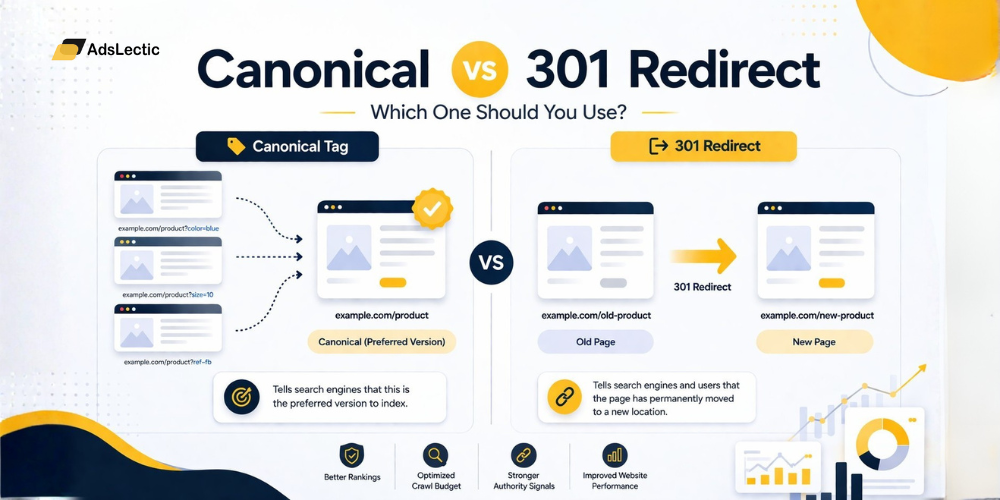
A 301 redirect is a permanent redirect that sends both users and search engines from one URL to another.
Key Features:
- Transfers nearly all link equity (ranking power)
- Removes the old URL from search results
- Improves user experience by avoiding dead pages
Example:
If a product is discontinued:
/old-product → 301 redirect → /new-productWhat is a Canonical Tag?
A rel=”canonical” tag tells search engines which version of a page is the “main” version when multiple similar URLs exist.
Key Features:
- Keeps multiple URLs accessible
- Consolidates ranking signals
- Acts as a hint (not a directive)
Example:
/product?color=blue → canonical → /productCanonical vs 301 Redirect: Key Differences
| Feature | 301 Redirect | Canonical Tag |
|---|---|---|
| User Experience | Redirects user to new page | User stays on same page |
| SEO Authority | Passes strong link equity | Passes partial signals |
| Indexing | Old URL removed | Multiple URLs exist |
| Control | Strong directive | Hint to search engines |
| Best Use Case | Deleted or moved pages | Duplicate or similar pages |
When to Use a 301 Redirect
Use a 301 redirect when a page is no longer needed or has been permanently replaced.
Best Use Cases:
- Deleted or discontinued products
- Website migrations (URL changes)
- HTTP → HTTPS transitions
- Old blog URLs → updated versions
Example:
If you remove a product, redirect it to:
- A similar product OR
- The main category page
When to Use a Canonical Tag
Use a canonical tag when multiple versions of a page should exist, but only one should rank.
Best Use Cases:
- Product variants (size, color)
- Filtered URLs (price, sorting)
- Tracking parameters (UTM tags)
- Pagination or faceted navigation
Example:
/shoes?color=black → canonical → /shoesE-commerce SEO: The Duplicate URL Problem
E-commerce websites often create multiple URLs for the same product:
- /product/shoe
- /collection/sale/product/shoe
- /product/shoe?size=10
This leads to keyword cannibalization, where multiple pages compete for the same keyword, splitting ranking power.
It also wastes crawl budget, meaning search engines spend time crawling unnecessary pages instead of indexing important ones.
If you’re facing indexing issues, check our guide on fixing crawled but not indexed pages
The Costly Mistake Most Sites Make
The biggest mistake?
Using a canonical tag instead of a 301 redirect for dead pages
Why this is bad:
- Google may ignore the canonical
- The old page still gets crawled
- Authority isn’t fully transferred
- You end up with weak rankings on both pages
Common Mistakes to Avoid
1. Using Canonical for Deleted Pages
If a page is gone—redirect it. Don’t canonicalize it.
2. Canonical Chains
Page A → Page B → Page C
This confuses search engines.
3. Redirect Loops
Page A → Page B → Page A
This breaks crawling completely.
4. Canonical to Non-Indexable Pages
If your canonical points to a noindex page, it becomes useless.
5. Wrong Internal Linking
If you canonicalize Page A → Page B, but still link to Page A internally, you send mixed signals.
Learn more about how to find and fix SEO issues with backlinks and site structure
SEO Best Practices for E-commerce Sites
- Use redirects for expired products
- Use canonicals for variants and filters
- Keep URL structure clean
- Avoid unnecessary parameters
- Regularly audit duplicate content
Regularly audit duplicate content issues and fix structural problems that impact rankings. If your site is already struggling, check this guide on how to fix SEO issues that stop your site from ranking.
FAQs
What is the difference between canonical and 301 redirect?
A 301 redirect moves users and search engines to a new URL, while a canonical tag signals the preferred version of similar pages.
Does a canonical tag pass link equity?
Yes, but not as strongly as a 301 redirect, and search engines may ignore it.
When should I use canonical instead of redirect?
Use canonical when you want multiple URLs accessible but only one indexed.
Is 301 redirect better than canonical?
Not better—just different. Use redirects for removed pages and canonicals for duplicate content.
Conclusion
Understanding the difference between canonical vs 301 redirect isn’t just technical—it directly impacts your rankings, traffic, and revenue.
A wrong implementation can dilute your SEO authority, while the right strategy can consolidate your rankings and boost visibility.
At AdsLectic, we specialize in identifying these hidden SEO issues and turning them into growth opportunities.
If your site is struggling with duplicate content or indexing issues, it’s time to fix the foundation.
Get a complete technical SEO audit and unlock your site’s true ranking potential.
![Hindi SEO Guide 2026: SEO Kya Hai, SEO Kaise Kare and How to Rank in Hindi Suggested slug: /hindi-seo-guide/ Meta title: Hindi SEO Guide 2026: SEO Kya Hai & SEO Kaise Kare Meta description: Hindi SEO guide: learn seo kya hai, seo kaise kare, Hindi keyword research, on page and off page SEO, and how to rank in Google AI Mode in Hindi. Primary keyword: hindi seo Secondary keywords: seo for hindi website, hindi keyword research, seo kaise kare, seo kya hai, seo ka matlab, ai mode kya hai, google ai mode hindi Publishing notes (delete before going live): add one real client example where marked [ADD], and adjust the two Adslectic call-to-action lines to match what your SEO page actually offers. Hindi SEO means optimizing your website, blog or landing pages so they rank when people search Google in Hindi, Hinglish or a mix of both. If you have ever typed 'seo kya hai' or 'seo kaise kare' into Google, you have already done the kind of search this guide is about. Many Indian business websites are still English-only, even though a large part of their audience searches in Hindi. That gap is an opportunity. In this guide you will learn what SEO is in simple Hindi, how Hindi keyword research works, how to handle on-page, off-page and local SEO for a Hindi website, and how to show up in Google AI Mode answers in Hindi. SEO Kya Hai? (SEO Ka Matlab and Meaning in Hindi) SEO का मतलब है Search Engine Optimization (सर्च इंजन ऑप्टिमाइज़ेशन)। आसान शब्दों में, SEO वह तरीका है जिससे आपकी वेबसाइट या ब्लॉग Google जैसे सर्च इंजन में ऊपर दिखती है, ताकि सही लोग आपको आसानी से ढूंढ सकें। In simple terms, SEO is the process of making your website easy for search engines to understand and useful for the people searching. Whether someone asks 'seo kya hota hai' or looks up 'seo meaning in hindi', the answer is the same: SEO helps the right visitors find your pages without you paying for every click. SEO has three main parts: • On-page SEO: what you do on the page itself, such as content, titles, headings and images. • Off-page SEO: what happens outside your site, mainly backlinks and brand mentions. • Technical SEO: how fast, mobile-friendly and crawlable your site is. Hindi SEO applies all three to Hindi-language content. Why Hindi SEO Matters in 2026 • India had about 886 million active internet users in 2024, and rural India made up 55% of them, according to the IAMAI-Kantar Internet in India report. • The same report found that 98% of users access content in Indic languages, and 57% of urban users prefer regional-language content. • Google launched AI Mode in Hindi in September 2025, then added seven more Indian languages and Search Live in October 2025. • Google has said that AI Mode users globally ask questions nearly three times longer than in traditional search, which favours content written to answer full questions. In many niches there are fewer well-optimized Hindi pages than English ones, so a well-built Hindi page has more room to rank. [ADD: one line from a real Adslectic campaign in a Hindi-speaking or Tier 2 market, such as an EdTech or travel client.] Hindi SEO Kaise Kare? Start With the Three Ways People Search Hindi searchers do not all use one script. Plan for three: Search style Example Where to use it Devanagari एसईओ क्या है Dedicated Hindi pages, titles and headings Hinglish (Hindi in Roman letters) seo kaise kare FAQs, subheadings and body text, including on English pages Mixed best मोबाइल under 10000 Product and comparison pages Google treats these as related but different queries, so a page written in only one script can miss the other audience. For every core topic, build three keyword clusters: English, Devanagari and Hinglish. Hindi Keyword Research Kaise Kare? Keyword research kya hai? It is the process of finding the words and questions your audience actually types into Google. For a Hindi website it works the same way, except the data is patchier, so you should use more than one source. 1. Start from your English topic list and write the Hindi, Hinglish and mixed versions of each term. 2. Check Google Keyword Planner. Keyword Planner kya hai? It is Google's free planning tool inside Google Ads that shows search volume ranges and keyword ideas. Set the location to India and test your terms under both Hindi and English language settings. 3. Mine Google Search Console. Filter your existing queries for Hindi characters and words like kaise, kya and kitna to see what real users already type. 4. Use Google autosuggest and People Also Ask. Type the Hindi and Hinglish version of your topic and note the suggestions and questions. 5. Look at the top 10 results. If most pages ranking for a Hindi query are thin or English-only, you have room to compete. A hindi keyword research tool or keyword research tool in Hindi can speed this up, but check its numbers against Search Console, because Hindi volumes are often underreported or missing in tools. Treat volume ranges as direction, not exact numbers. A term showing 10 to 100 monthly searches can still bring valuable visitors, and many small terms add up when one well-built page covers them together. That is why this guide also answers questions like on page seo kya hai, off page seo kya hai and backlink kya hai in one place. For the fundamentals, see our keyword research tips. On-Page SEO Kya Hai? Hindi Website Par Kaise Kare On-page SEO kya hai? It is the work of optimizing the content and HTML of each page so search engines and readers understand it. For a Hindi website, focus on these points: • Title and meta description: write them in the page language, with the main keyword near the start. Aim for roughly 60 characters for the title and 155 for the description, and check the preview, because Devanagari takes more space than Latin letters. • H1 and headings: use one H1 with your main keyword and question-style H2s such as 'Hindi SEO kaise kare?'. Our guide on the H1 tag in SEO explains why this matters. • URL slugs: short Roman-letter slugs such as /hindi-seo-guide/ are easy to read and share. Pick one style and stay consistent. • Language setup: give Hindi pages their own indexable URLs, set the page language to Hindi, and use hreflang to connect Hindi and English versions of the same page. See our international SEO best practices. • Write natively: write Hindi content for Hindi readers instead of running English text through a translator. Translated phrasing rarely matches how people actually search. • Image SEO kaise kare: use descriptive file names, write alt text in the page language, and compress images so pages load fast. • Keyword density kya hai: it is the share of a page made up by a keyword. There is no magic percentage. Use your main keyword in the title, the first paragraph and a few headings, then write naturally. • Schema markup: add Article, FAQPage and BreadcrumbList schema to your posts. Our schema markup guide shows how. Doing this across dozens of pages takes time and consistency. If you would rather have a team plan and run it with you, take a look at our SEO services to see how we approach search for growing businesses. Technical SEO and Mobile SEO Kya Hai? Mobile SEO kya hai? It means making sure your pages load quickly, read clearly and work well on phones, because a large share of Indian users browse on mobile. For Hindi pages, check these basics: • Use a Devanagari font that renders cleanly on all devices and loads quickly, so characters never appear broken. • Keep pages light, and compress images and scripts. See our core web vitals guide. • Make sure Hindi pages are crawlable, included in your sitemap and indexed. • Run a regular check using our technical SEO audit checklist. Off-Page SEO Kya Hai? Backlink Kya Hota Hai? Backlink kya hai? A backlink is a link from another website to yours. Search engines treat good links as a sign of trust. Off-page SEO kya hota hai? It is everything you do outside your own site to build that trust, including backlinks, brand mentions, directory listings, social profiles and video. For Hindi SEO, these off-page steps work best: • Earn links and mentions from Hindi publications, regional blogs and relevant business directories. • Publish Hindi videos on YouTube with Hindi titles and a clear description linking back to your page. • Take part in Hindi discussions on forums and Q&A sites as a real person, not by dropping links. • Keep your business name, description and contact details consistent everywhere they appear. Quality matters more than quantity. A few relevant links beat hundreds of low-quality directory or bookmarking links, and Google's spam systems are built to catch manipulative link tactics. At Adslectic, we treat off-page SEO as brand building first and link building second. To find your own link opportunities, read our guide on how to find inbound links. Local SEO Kya Hai? Local SEO kya hai? It is optimizing your business to appear for searches with local intent, such as a service plus a city name or 'near me'. Complete your Google Business Profile, keep your name, address and phone number consistent, collect genuine reviews, and use local phrases in Hindi and Hinglish on your service pages. For a regional example, see our digital marketing guide for Delhi NCR. Blog Ka SEO Kaise Kare? (Blogger and WordPress) Blog seo kaise kare is one of the most common Hindi SEO questions. These steps apply whether you use Blogger or WordPress: 1. Pick one main keyword per post and use it in the title, H1 and first paragraph. 2. Use clear H2 headings, many of them as questions your readers ask. 3. Link to related posts on your own blog. 4. Add alt text to images, in the same language as the post. 5. Add your blog to Google Search Console and submit your sitemap. Our Search Console guide covers what to track once you are set up. 6. Update old posts instead of letting them go stale. If your posts are live but traffic is flat, read why blog posts are not getting traffic. Black Hat SEO Kya Hai? Black hat SEO kya hai? These are tactics that break Google's spam policies, such as hidden text, cloaking, auto-generated spam content and link schemes. They may give short-term gains, but they risk losing your rankings entirely. Google rolls out spam updates regularly, and the latest one began on 24 September 2026. Stick to useful content and honest link building, and read our guide to recovering from the March 2026 spam update if you have seen a traffic drop. AI Mode Kya Hai? Google AI Mode Hindi Me Kaise Rank Kare AI Mode kya hai? It is a tab in Google Search that gives AI-generated answers to longer, more complex questions and lets people ask follow-ups by text, voice or image. Google launched it in Hindi in September 2025. In October 2025 it added Bengali, Kannada, Malayalam, Marathi, Tamil, Telugu and Urdu, along with Search Live in English and Hindi. Google has said that the same foundational SEO practices apply to its AI search features, so good SEO is still the base. To improve your chances of being cited in Google AI Mode in Hindi: • Answer first. Put a clear two or three line answer directly under each heading, then expand. • Use question headings in natural Hindi and Hinglish, such as 'AI Mode kya hai?'. • Add specifics: city names, prices in rupees, steps, examples and real numbers. • Keep your brand details consistent across your website, profiles and listings so your business is easy to verify. • Add FAQ schema and keep the page crawlable and indexable. For the wider picture, read our generative engine optimization guide and our explainer on AI Overviews. How to Measure Hindi SEO Results • In Search Console, filter by the page folder or URLs of your Hindi content, and use a query filter for Hindi characters and Hinglish words like kaise and kya. • Compare impressions, clicks and click-through rate for Hindi pages against your English pages. • Track leads and conversions from Hindi landing pages, not only traffic. Our GA4 SEO reporting dashboard guide shows how to set this up. • Review monthly. Hindi queries often grow slowly before they compound. Common Hindi SEO Mistakes 1. Machine-translating English pages and publishing them unchanged. 2. Optimizing only for Devanagari and ignoring Hinglish, or the reverse. 3. Trusting one keyword tool and skipping a keyword because it shows low or no volume. 4. Mixing languages on a page with no clear structure. 5. Ignoring mobile speed on Devanagari pages. 6. Reporting Hindi results inside the same totals as English. Hindi SEO Ka 30-Day Starter Plan Week What to do 1 Pull Hindi and Hinglish queries from Search Console and build three keyword clusters for your top three services 2 Publish two native Hindi pages with correct language settings, schema and clean slugs 3 Add Hinglish FAQs to your best-performing English pages 4 Set up a separate Hindi report in Search Console and GA4, then review what is ranking FAQs SEO kya hai? SEO ka matlab hai Search Engine Optimization, the process of improving your website so it ranks higher in search results and attracts the right visitors. Hindi SEO kaise kare? Research Hindi, Hinglish and mixed keywords, write native Hindi content, set up page language and hreflang correctly, build quality links, and track Hindi pages separately. Kya Hindi SEO English SEO se alag hai? The fundamentals are the same. The differences are handling more than one script, patchier keyword data and a mostly mobile audience. Hindi keyword research kaise kare? Combine Google Keyword Planner, Search Console queries, autosuggest and People Also Ask, and check the top results for each term. On-page SEO kya hai aur off-page SEO kya hai? On-page SEO is what you optimize on your pages. Off-page SEO is what builds your authority elsewhere, mainly backlinks and brand mentions. Backlink kya hota hai? A backlink is a link from another website to yours, and quality, relevant backlinks help build trust with search engines. Kya Google AI Mode Hindi me kaam karta hai? Yes. Google launched AI Mode in Hindi in September 2025 and has added more Indian languages since. Kya mujhe alag Hindi website chahiye? No. A Hindi section on your existing domain, with its own URLs and hreflang, is usually enough. Conclusion Hindi SEO is not about translating your English site. It is about understanding how Hindi and Hinglish searchers actually look for answers, then building pages, links and measurement around that. Start with one service, build the three keyword clusters, publish a few native Hindi pages and track them on their own. [ADD: closing line inviting readers to get in touch.] Sources • IAMAI-Kantar Internet in India Report 2024, via The Tech Panda • Google India: AI Mode now in Hindi • Google India: New languages in AI Mode and Search Live • TechCrunch: Search Live and AI Mode languages in India • Search Engine Land: Google algorithm updates](https://adslectic.com/wp-content/uploads/2026/10/seo-hindi-banner.png)