If your website is not ranking despite publishing consistent content, the problem is almost certainly technical — not your writing.
Behind every high-ranking website is a strong technical foundation. Even the most valuable, well-researched content can struggle to appear in Google Search if your website has crawl errors, incorrect indexing directives, slow loading speeds, broken internal links, duplicate content, or missing structured data. These are the hidden barriers that prevent search engines from accessing, understanding, and ranking your pages.
A technical SEO audit is the most reliable way to identify and fix those barriers. Rather than guessing what is hurting your rankings, this step-by-step guide gives you a systematic, proven process for evaluating your website’s technical health from the ground up.
Whether you manage a small business website, an eCommerce store, a WordPress blog, or a large enterprise site, this technical SEO audit checklist will help you uncover the issues that are limiting your organic visibility — and show you exactly how to fix them.
Unlike generic checklists that only tell you what to check, this guide explains why each step matters, how to perform it correctly, which tools to use, and how to fix the most common issues you will encounter.
In This Guide, You Will Learn
- What a technical SEO audit is and why it matters in 2026
- The difference between a technical SEO audit and a complete SEO audit
- Which tools professional SEOs use before starting an audit
- How to identify and fix crawlability and indexability issues
- How to improve your website’s structure and internal linking
- How to audit and improve Core Web Vitals and page performance
- How to validate structured data and prepare for AI search readiness
- A complete, printable technical SEO audit checklist for ongoing use
Estimated Reading Time: 15–18 minutes
Best For: Website owners, SEO professionals, digital marketers, developers, bloggers, eCommerce store owners, and agencies.
What Is a Technical SEO Audit?
A technical SEO audit is a systematic review of your website’s technical infrastructure to identify issues that prevent search engines from efficiently crawling, rendering, indexing, and understanding your content.
It covers critical elements such as crawlability, indexability, site architecture, page speed, Core Web Vitals, structured data, mobile usability, HTTPS security, XML sitemaps, robots.txt configuration, canonical tags, redirect chains, and internal linking — all of which directly influence how well your website performs in organic search.
Unlike content optimization or link building, technical SEO focuses on the behind-the-scenes foundation that makes every other SEO effort possible. Think of it this way: even the best content on the internet cannot rank if Google cannot crawl it, cannot index it correctly, or delivers a slow and frustrating experience to users.
Quick Definition: A technical SEO audit is a structured evaluation of your website’s technical health — identifying and resolving issues that affect crawlability, indexability, page performance, and overall search visibility.
Technical SEO Audit vs. SEO Audit: What Is the Difference?
Many website owners use these two terms interchangeably. They are not the same.
A technical SEO audit focuses specifically on the technical elements of your website that influence how search engines crawl, render, and index your content — areas such as site speed, Core Web Vitals, crawl errors, XML sitemaps, canonical tags, HTTPS, structured data, internal linking, and mobile usability.
A complete SEO audit, on the other hand, goes significantly further. It also evaluates your content quality, keyword strategy, on-page optimization, backlink profile, competitor performance, user experience, and overall organic search performance.
In simple terms:
| Area | Technical SEO Audit | Complete SEO Audit |
|---|---|---|
| Crawlability | ✅ | ✅ |
| Indexability | ✅ | ✅ |
| Website Performance | ✅ | ✅ |
| Core Web Vitals | ✅ | ✅ |
| Structured Data | ✅ | ✅ |
| Internal Linking | ✅ | ✅ |
| Content Optimization | ❌ | ✅ |
| Keyword Research | ❌ | ✅ |
| Backlink Analysis | ❌ | ✅ |
| Competitor Analysis | ❌ | ✅ |
For the best results, a technical SEO audit should always be the foundation of every complete SEO audit. Once your website is technically healthy, your content and link-building efforts can deliver stronger, more consistent, and more sustainable results.
Why Technical SEO Audits Matter in 2026
Search engines have become dramatically more sophisticated. Today, Google’s ranking systems evaluate not only the quality and relevance of your content but also how efficiently and reliably your website performs from a technical perspective.
If Google encounters crawl errors, conflicting canonical tags, slow-loading pages, broken internal links, or JavaScript rendering issues, your rankings can suffer regardless of how valuable your content is. And in 2026, there is an additional layer: AI-powered search experiences are now changing how websites are discovered and presented to users. Search engines increasingly rely on structured, well-organized, and technically accessible content to generate accurate answers and AI-powered results. A technically optimized website is better positioned to perform across both traditional search and emerging AI search.
A technical SEO audit can help you:
- Improve crawlability so Google discovers your important pages more efficiently
- Resolve indexing issues that are keeping valuable content out of search results
- Strengthen your website’s architecture and internal linking for better PageRank flow
- Improve Core Web Vitals and overall page experience signals
- Validate structured data to increase eligibility for rich results and featured snippets
- Detect and fix duplicate content, redirect chains, broken links, and orphan pages
- Improve mobile usability and overall user experience
- Build a stronger technical foundation for long-term SEO growth and AI search readiness
Pro Tip: Schedule a comprehensive technical SEO audit every quarter. Perform monthly technical health checks after major website updates, redesigns, content migrations, or any sudden drop in organic traffic.
How Often Should You Perform a Technical SEO Audit?
There is no universal schedule, but regular audits prevent technical issues from accumulating and compounding over time.
As a general guideline:
- Small business websites: Every 3–6 months
- Blogs publishing content regularly: Every quarter
- eCommerce websites: Monthly health checks with quarterly full audits
- Large enterprise websites: Continuous monitoring with scheduled technical reviews
You should also perform a technical SEO audit immediately after:
- Launching a new website or a new section of an existing website
- Redesigning your website or migrating to a new theme
- Moving to a new CMS platform
- Changing your website’s URL structure
- Publishing a large volume of new pages or products
- Completing a domain migration or HTTPS migration
- Experiencing a sudden, unexplained drop in organic traffic
Regular audits catch technical problems before they become serious ranking issues — making them one of the most valuable and repeatable practices in any long-term SEO strategy.
Before You Start: Tools You Will Need
A reliable technical SEO audit depends on good data. While some checks can be done manually, professional SEO tools uncover hidden issues far faster and provide actionable insights that would otherwise take hours to find.
Experienced SEO professionals combine first-party data from Google with specialized crawling tools and performance testing software to evaluate technical health from multiple angles.
1. Google Search Console
Google Search Console is the non-negotiable starting point for every technical SEO audit. It provides first-party data directly from Google — the most authoritative source you can access.
Use it to:
- Monitor page indexing status across your entire site
- Review crawl and indexing coverage reports
- Detect crawl errors and URL inspection issues
- Validate and resubmit your XML sitemap
- Monitor Core Web Vitals performance by URL group
- Identify pages Google has excluded from its index and why
Pro Tip: Start your audit in the Pages report within Google Search Console. It immediately surfaces indexing issues that should be prioritized before you make any other technical changes.
2. Google Analytics 4 (GA4)
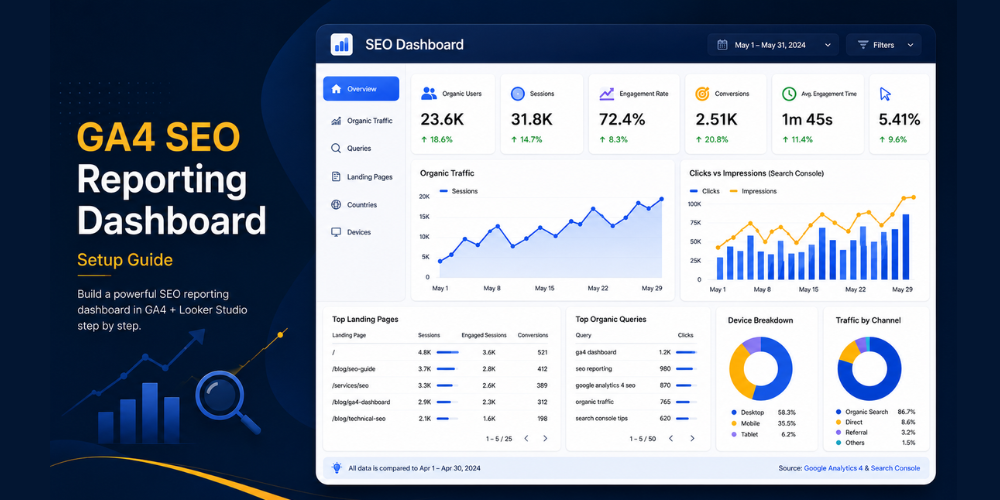
GA4 helps you understand how technical issues affect real users through behavioral data.
Use it to:
- Monitor organic traffic trends and identify sudden drops
- Identify pages with unusually high exit rates or low engagement
- Prioritize high-traffic pages that need technical improvements first
- Cross-reference page performance data with your technical audit findings
3. Screaming Frog SEO Spider
Screaming Frog crawls your website the same way a search engine does, making it one of the most practical tools for identifying technical issues at scale. The free version crawls up to 500 URLs.
Use it to:
- Find broken internal links and 404 errors
- Detect redirect chains and redirect loops
- Audit title tags and meta descriptions across all pages
- Discover duplicate content and duplicate page titles
- Analyze your internal linking structure
- Identify orphan pages and pages with insufficient internal links
- Review canonical tag implementation
Pro Tip: Export your crawl data into a spreadsheet and prioritize fixing issues affecting your highest-traffic and highest-value landing pages before addressing lower-priority URLs.
4. Google PageSpeed Insights
Website speed directly affects both user experience and search performance. PageSpeed Insights measures your website’s loading performance and provides specific, actionable recommendations.
Use it to:
- Measure Core Web Vitals — LCP, INP, and CLS — at the individual URL level
- Identify render-blocking resources slowing down page loads
- Get specific image and JavaScript optimization recommendations
- Compare mobile versus desktop performance
5. Google Lighthouse
Lighthouse generates comprehensive audit reports covering performance, accessibility, SEO, and technical best practices. Available directly in Chrome DevTools.
Use it to:
- Audit page performance and diagnose specific bottlenecks
- Test accessibility improvements and catch missing alt text
- Review on-page SEO recommendations
- Validate technical optimizations after implementing fixes
Quick Preparation Checklist
Before starting your audit, confirm you have:
✅ Access to Google Search Console (verified property)
✅ Access to Google Analytics 4
✅ Screaming Frog or another website crawler installed
✅ Your website’s XML sitemap URL
✅ Access to your CMS or server to implement fixes
✅ Developer availability if complex technical changes are needed
With your tools in place, you are ready to work through the five-step technical SEO audit checklist below.
Step 1: Audit Your Website’s Crawlability
Crawlability is where every technical SEO audit must begin. If Google cannot crawl your pages, no other optimization matters — those pages cannot appear in search results regardless of how well they are written or structured.
A crawlability audit identifies the barriers that prevent search engines from navigating and discovering your website efficiently. These barriers typically include misconfigured robots.txt files, broken internal links, orphan pages, redirect chains, and XML sitemap issues.
Why Crawlability Matters
Search engines allocate a limited crawl budget to every website. When Googlebot encounters unnecessary redirects, broken links, blocked resources, or duplicate URLs, it wastes crawl resources that could have been used to discover and evaluate your important pages.
Poor crawlability can lead to:
- Important pages not appearing in Google Search results
- Slow or incomplete indexing of new content
- Orphan pages remaining permanently undiscovered
- Reduced crawl frequency for high-value pages
A technically healthy website makes it straightforward for search engines to discover, evaluate, and prioritize your most valuable content.
How to Audit Crawlability
1. Review Your robots.txt File
Your robots.txt file tells search engines which sections of your website they can and cannot access. An incorrect configuration can accidentally block important pages from being discovered — one of the most damaging and easily overlooked technical SEO mistakes.
Visit: https://yourdomain.com/robots.txt
Review the file carefully and confirm it is not blocking any key areas such as:
- Blog articles and category pages
- Product and service pages
- Images and important media assets
- CSS and JavaScript files (blocking these prevents proper page rendering)
Also confirm that your XML sitemap URL is referenced correctly:
Sitemap: https://yourdomain.com/sitemap.xml
Common issues to look for:
- Blocking important directories accidentally
- Missing sitemap declaration
- Blocking JavaScript or CSS files that are needed for rendering
- Using a blanket
Disallow: /that blocks all crawlers
How to fix: Remove unnecessary Disallow rules. Keep robots.txt minimal and test any changes using Google Search Console’s robots.txt tester before deploying.
2. Validate Your XML Sitemap
An XML sitemap acts as a roadmap for search engines, helping them discover and prioritize the most important pages on your website. An outdated or incorrectly formatted sitemap wastes crawl budget and slows content discovery.
Open your sitemap (yourdomain.com/sitemap.xml) and verify that it:
- Contains only indexable, live URLs
- Excludes redirected pages, 404 pages, and noindex pages
- Includes all recently published content
- Updates automatically when new pages are added
Submit or resubmit your sitemap in Google Search Console under Sitemaps. After publishing important new content, resubmit to encourage faster crawling and indexing.
3. Find and Fix Broken Internal Links
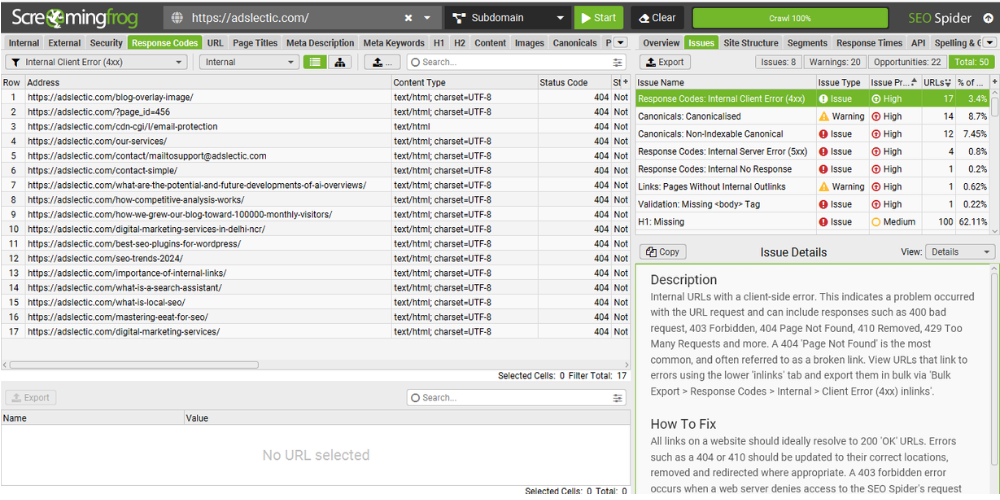
Broken links interrupt the crawling process, waste crawl budget, and create a frustrating user experience. A page a user or search engine cannot reach is effectively invisible.
Run a full crawl using Screaming Frog and filter by Response Code: 4XX to identify:
- Broken internal page links
- Broken navigation links
- Broken image URLs
Replace broken links with valid, live URLs, or implement 301 redirects from the broken URL to the most relevant replacement page.
4. Identify Orphan Pages
Orphan pages are pages that exist on your website but have no internal links pointing to them. Since search engines primarily discover content by following internal links, orphan pages are rarely crawled, rarely indexed, and almost never ranked.
How to find them: Compare your XML sitemap URLs against the pages discovered in your Screaming Frog crawl. Any URL that appears in the sitemap but has no internal links pointing to it is an orphan page.
How to fix:
- Add contextual internal links from relevant, related pages
- Include orphan pages within relevant category or pillar pages
- Improve your navigation hierarchy to surface important pages naturally
5. Review Redirect Chains
A redirect chain occurs when Page A redirects to Page B, which redirects to Page C. Every additional hop wastes crawl budget, slows page loading time, and dilutes link equity.
Example of a redirect chain to fix:
Page A → Page B → Page C
Should become:
Page A → Page C (direct 301 redirect)
Use Screaming Frog’s Redirect Chains report to identify and collapse all multi-hop redirect sequences to single, direct redirects.
Common Crawlability Issues
| Issue | Why It Matters | Recommended Fix |
|---|---|---|
| Blocked pages in robots.txt | Google cannot crawl important pages | Update and test robots.txt directives |
| Missing XML sitemap | Slower content discovery | Generate and submit a complete sitemap |
| Broken internal links | Interrupts crawling and user navigation | Replace or 301 redirect broken URLs |
| Redirect chains | Wastes crawl budget and link equity | Redirect directly to the final destination |
| Orphan pages | Never discovered or ranked by Google | Add contextual internal links |
Quick Crawlability Checklist
✅ robots.txt is not blocking any important pages or assets
✅ XML sitemap is complete, up-to-date, and submitted in Google Search Console
✅ No redirect chains longer than one hop exist
✅ Broken internal links have been identified and fixed
✅ All important pages receive at least one internal link
✅ Google Search Console shows no critical crawl errors
Step 2: Audit Your Website’s Indexability
Crawlability and indexability are often confused, but they are two distinct problems. A page being crawled does not guarantee it will be indexed.
After Google discovers a page, it evaluates that page against a set of technical and quality signals to decide whether it deserves a place in its index. The signals Google evaluates at this stage include canonical tags, noindex directives, duplicate content, page quality, and overall site health.
If your important pages are not indexed, they cannot appear in search results — and they cannot generate organic traffic — regardless of how well-optimized they are.
Why Indexability Matters
Many websites lose significant organic traffic because valuable pages sit outside Google’s index without the site owner ever realizing it. The most common causes are:
- Incorrect noindex tags accidentally applied to live pages
- Canonical tags pointing to the wrong URL
- Duplicate or near-duplicate content across multiple URLs
- Soft 404 errors that return a 200 status code but contain no useful content
- Pages with thin content that Google judges not worth indexing
Most of these issues can be identified quickly through Google Search Console.
How to Audit Indexability
1. Review Google’s Indexing Report
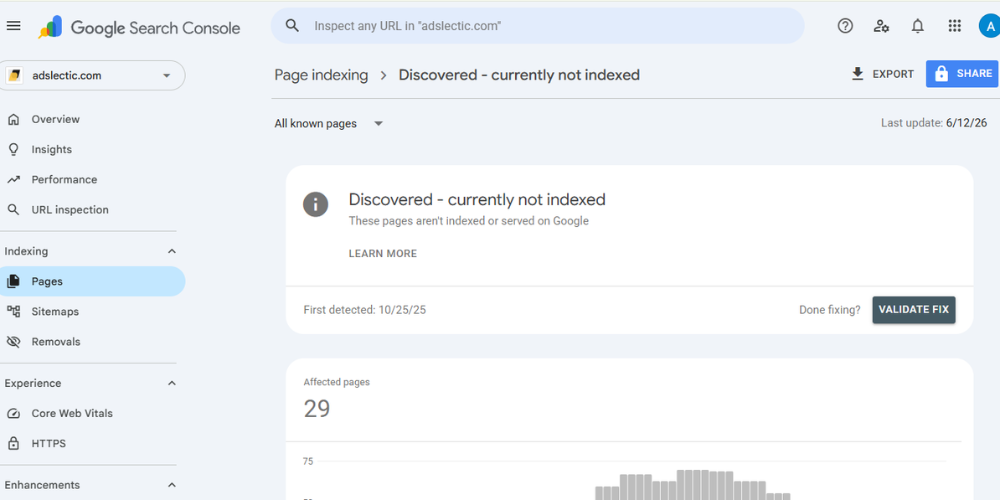
Open Google Search Console and navigate to Pages → Indexing. Review both your indexed and non-indexed pages carefully.
Pay close attention to excluded pages and Google’s reason for exclusion. Common statuses include:
- Crawled – currently not indexed — Google crawled the page but chose not to index it
- Discovered – currently not indexed — Google found the URL but has not yet crawled it
- Duplicate without user-selected canonical — Google found duplicate versions of the page
- Excluded by noindex tag — A noindex directive is preventing indexing
- Alternate page with proper canonical tag — A canonical tag is redirecting authority to another version
Each status tells you something specific about the underlying technical issue.
Internal Resource: If you encounter pages marked as “Crawled – Currently Not Indexed,” this is one of the most misunderstood issues in technical SEO. Our detailed guide on how to fix Crawled – Currently Not Indexed walks through every possible cause and gives you a step-by-step recovery process.
2. Check Canonical Tags
Canonical tags tell search engines which version of a page is the preferred version, helping prevent duplicate content from splitting ranking signals.
Every important page should have a self-referencing canonical tag in the <head> unless it intentionally points to a different canonical version.
Common canonical issues:
- Pages with no canonical tag at all
- Canonical tags pointing to the wrong URL (e.g., pointing to a staging domain)
- Canonical chains (Page A canonicals to Page B, which canonicals to Page C)
- Canonical tags that conflict with noindex directives on the same page
Use Screaming Frog to export all canonical tags across your site and verify they point to the correct URLs.
3. Review Noindex Directives
A single misplaced noindex directive can remove an important page from Google’s index entirely. This happens more frequently than most people realize — particularly after website migrations, theme updates, or CMS platform changes.
Check every important page for this tag in the <head>:
<meta name="robots" content="noindex">
If found on pages that should be indexed, remove it immediately and request re-indexing through Google Search Console’s URL Inspection tool.
4. Identify and Resolve Duplicate Content
Duplicate content confuses search engines and splits your ranking signals across multiple URLs. Google struggles to determine which version to index and rank, often choosing neither.
Common sources of duplicate content:
- www vs. non-www versions of your website both accessible
- HTTP and HTTPS versions both accessible
- Parameter-based URLs (
/products?sort=pricevs./products) - Printer-friendly page versions
- Similar product or service pages with slightly different copy
- Paginated category pages without proper canonical implementation
How to fix:
- Implement 301 redirects to consolidate duplicate URL versions
- Add canonical tags pointing to the preferred version
- Merge genuinely thin or redundant content into a single, stronger page
5. Inspect Your Most Important URLs
Use Google Search Console’s URL Inspection Tool for your highest-value pages — your main landing pages, top blog posts, and priority product or service pages.
For each page, confirm:
- Page is indexed and the correct version is indexed
- Canonical URL matches your intended URL
- Mobile version is accessible and rendering correctly
- Structured data is being detected without errors
- Last crawl date is recent (not weeks ago)
Common Indexability Issues
| Issue | Why It Matters | Recommended Fix |
|---|---|---|
| Noindex on important pages | Prevents the page from ranking | Remove unintended noindex directives |
| Incorrect canonical tags | Google indexes the wrong page | Implement self-referencing canonicals |
| Duplicate content | Dilutes ranking signals | Consolidate or canonicalize duplicate pages |
| Soft 404 pages | Low-quality signals to Google | Improve content or return the correct status code |
| Crawled but not indexed | Valuable pages remain invisible | Improve quality, internal links, and technical signals |
Quick Indexability Checklist
✅ All important pages appear as indexed in Google Search Console
✅ Canonical tags are correctly configured on every page
✅ No unintended noindex directives exist on live pages
✅ Duplicate content has been consolidated or canonicalized
✅ URL Inspection confirms your most important pages are healthy
✅ Google Search Console shows no critical indexing coverage errors
Step 3: Audit Your Website’s Structure and Internal Linking
A well-organized website structure helps both users and search engines navigate your content efficiently. Even if your pages are crawlable and fully indexed, poor site architecture makes it difficult for Google to understand the relationships between your pages, distribute ranking signals effectively, and determine which pages carry the most authority.
During this step of your technical SEO audit, you will evaluate your URL structure, navigation hierarchy, internal linking, breadcrumb implementation, and page depth — all of which together determine how efficiently PageRank flows through your website.
Think of your website as a road network. Every page should be easy to discover, logically connected to related content, and reachable within a small number of steps from your homepage.
Why Website Structure Matters
A clear, logical website structure allows search engines to:
- Discover new content faster through internal links
- Understand topical relationships between pages
- Pass link equity more efficiently from authoritative pages to newer pages
- Reduce crawl depth and reach more pages per crawl session
- Enhance the overall user experience, which reduces bounce rates
A poorly organized website creates confusing navigation, excessive click depth, duplicate category pages, and weak internal linking — all of which directly suppress SEO performance.
How to Audit Website Structure
1. Review Your URL Structure
URLs should be short, descriptive, and easy for both users and search engines to read at a glance.
Good URL structure:
https://yourdomain.com/blog/technical-seo-audit-checklist/
Problematic URL:
https://yourdomain.com/page?id=48392&cat=15&ref=sidebar
Best practices for SEO-friendly URLs:
- Keep URLs as short as possible while remaining descriptive
- Use lowercase letters only
- Separate words using hyphens, never underscores
- Include your target keyword naturally in the URL
- Avoid unnecessary parameters, session IDs, or tracking variables
- Maintain a consistent, logical URL hierarchy
Important: Do not change URLs unless there is a clear, measurable SEO benefit. Changing URLs without 301 redirects breaks incoming links and loses accumulated ranking history.
2. Evaluate Your Navigation Structure
Your navigation menu is one of the most important elements of your website’s structure. It tells search engines which pages you consider most important, and it helps users reach the information they need quickly.
Check whether:
- Your most important pages are included in the main navigation
- Categories are organized in a logical, intuitive hierarchy
- Navigation labels are descriptive and keyword-relevant
- Users can reach any key page without confusion
- Mobile navigation works correctly and does not create usability issues
If users struggle to navigate your website, search engines encounter similar challenges — and both result in worse performance.
3. Review and Strengthen Internal Linking
Internal links are among the most powerful and underutilized tools in technical SEO. They help search engines discover content, understand how related pages connect, and distribute PageRank across your website.
Every important page should receive contextual internal links from related articles, category pages, and pillar content — not just from the navigation menu.
Internal linking best practices:
- Use descriptive, keyword-rich anchor text (not “click here” or “read more”)
- Link from high-authority pages to newer or lower-authority pages
- Link to related content within the body of articles, not just in sidebars or footers
- Ensure every new piece of content links to at least 2–3 relevant existing pages
- Update older articles to link to new content you publish
For example, if you are working through this audit and notice your website has slow Core Web Vitals scores, your page speed section should naturally link to a dedicated resource that explains how to fix those metrics in detail — exactly the kind of contextual link that helps both readers and search engines follow the most relevant path through your content.
If during your indexability audit you find pages marked as “Crawled – Currently Not Indexed,” one of the most effective fixes is improving their internal link profile. Our guide on fixing Crawled – Currently Not Indexed pages explains precisely how strengthening internal links can push those pages from excluded to indexed.
4. Check Click Depth for Important Pages
Click depth refers to the number of clicks it takes a user to reach a page starting from the homepage. Pages buried deep within your website receive less crawl attention and weaker internal link authority.
Ideal structure:
Homepage → Category Page → Article (3 clicks maximum)
Problematic structure:
Homepage → Category → Subcategory → Archive → Tag → Article (5–6 clicks)
Use Screaming Frog to generate a crawl depth report. Any important page deeper than 3–4 clicks from your homepage should be elevated through navigation improvements or additional internal links.
5. Verify Breadcrumb Navigation
Breadcrumbs improve user navigation by showing visitors where they are within your website’s hierarchy. They also provide an additional internal linking signal and enable breadcrumb-rich snippets in search results.
Example breadcrumb:
Home > Blog > Technical SEO > Technical SEO Audit Checklist
If your website uses breadcrumbs, confirm they are:
- Consistent across all pages
- Implemented with BreadcrumbList schema markup
- Reflecting the correct page hierarchy
Common Website Structure Issues
| Issue | Why It Matters | Recommended Fix |
|---|---|---|
| Deep page hierarchy | Reduces crawl efficiency and link authority | Keep important pages within 3 clicks |
| Weak internal linking | Weakens topical authority and PageRank flow | Add contextual links from related pages |
| Inconsistent URLs | Confuses users and search engines | Standardize and maintain consistent URL structure |
| Missing breadcrumbs | Missed navigation and schema opportunity | Implement BreadcrumbList schema markup |
| Orphan pages | Difficult for search engines to discover | Add relevant internal links from category pages |
Quick Website Structure Checklist
✅ URLs are short, lowercase, descriptive, and keyword-relevant
✅ Important pages are reachable within three clicks from the homepage
✅ Internal links connect related content using descriptive anchor text
✅ Breadcrumb navigation is implemented and marked up with schema
✅ Navigation menus are organized logically and tested on mobile
SEO Tip: Every time you publish a new blog post, link it to at least 2–4 existing related articles and go back to update older articles with links to the new content. This habit strengthens topical authority, improves crawl efficiency, and distributes PageRank across your website consistently over time.
Step 4: Audit Core Web Vitals and Website Performance
Website performance is one of the most consequential areas of technical SEO. Fast-loading, responsive websites deliver a better user experience and are rewarded by Google’s ranking systems. Slow, unstable websites frustrate users, increase bounce rates, and receive lower page experience signals.
Google uses Core Web Vitals as the primary measurable indicators of page experience. These are real-world performance metrics measured from actual user data — not just lab simulations — which makes them particularly important to monitor and improve.
Why Core Web Vitals Matter
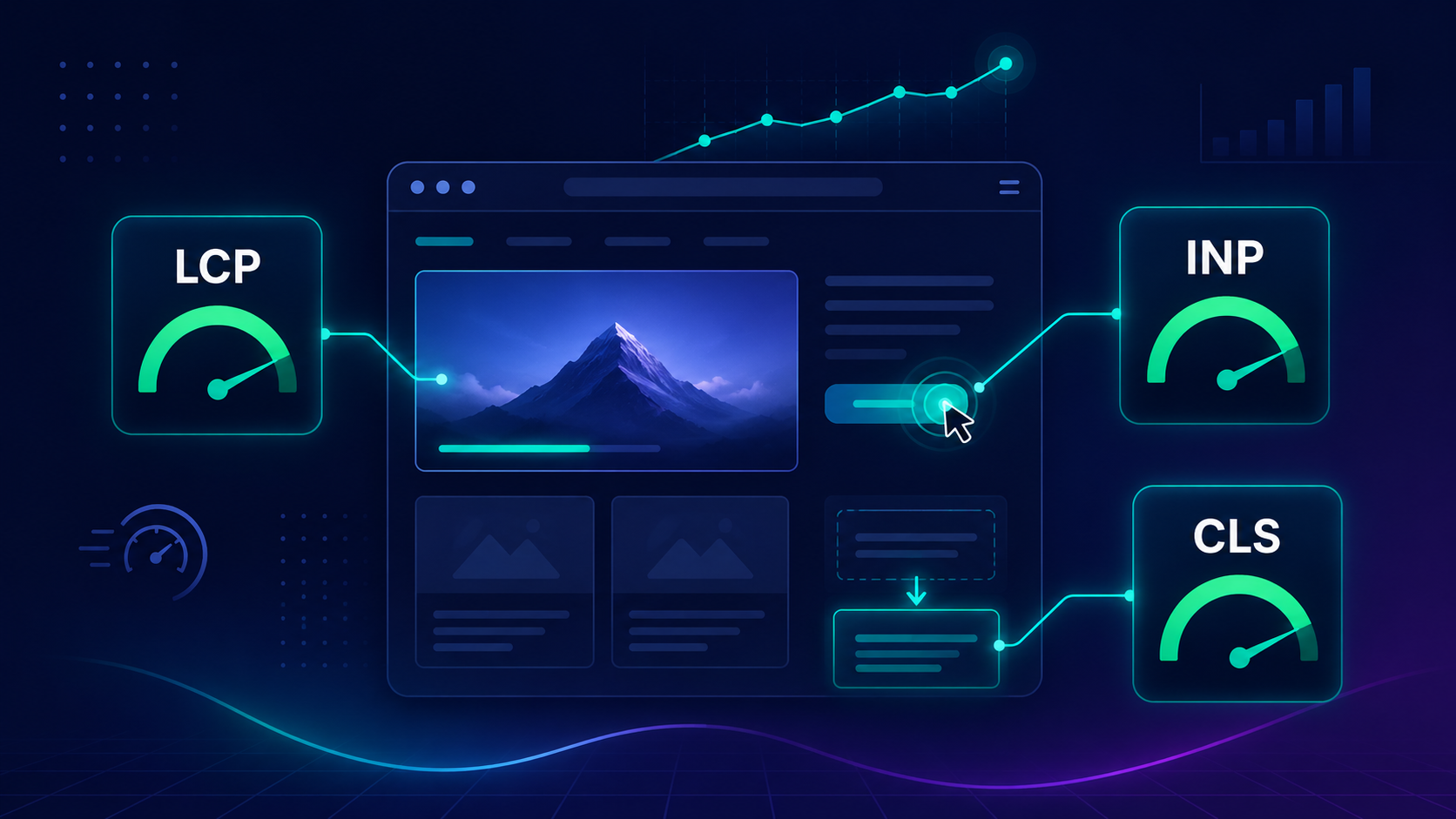
Core Web Vitals measure three specific dimensions of how users experience a webpage in real-world conditions:
LCP (Largest Contentful Paint): Measures how quickly the main content of a page loads. Target: 2.5 seconds or less.
INP (Interaction to Next Paint): Measures how quickly your page responds to user interactions such as clicks, taps, and keyboard input. Replaced FID as the interactivity metric in March 2024. Target: 200ms or less.
CLS (Cumulative Layout Shift): Measures how much the visible page layout shifts unexpectedly as the page loads. Target: 0.1 or less.
Poor scores on any of these metrics indicate performance bottlenecks that negatively impact both user satisfaction and search performance.
Related Reading: For a complete, step-by-step walkthrough of diagnosing and fixing LCP, INP, and CLS issues on your specific website, see our Core Web Vitals guide, which covers the technical root causes, practical fixes, and how to verify improvements using Google Search Console field data.
How to Audit Website Performance
1. Start With Google Search Console Core Web Vitals Report
Navigate to Experience → Core Web Vitals in Google Search Console. This report shows field data — real user measurements — grouped by URL pattern.
Prioritize fixing URLs marked as Poor first, then those marked as Needs Improvement. These URLs are actively underperforming against Google’s thresholds and are most likely affecting your rankings and user retention.
2. Test Individual Pages With Google PageSpeed Insights
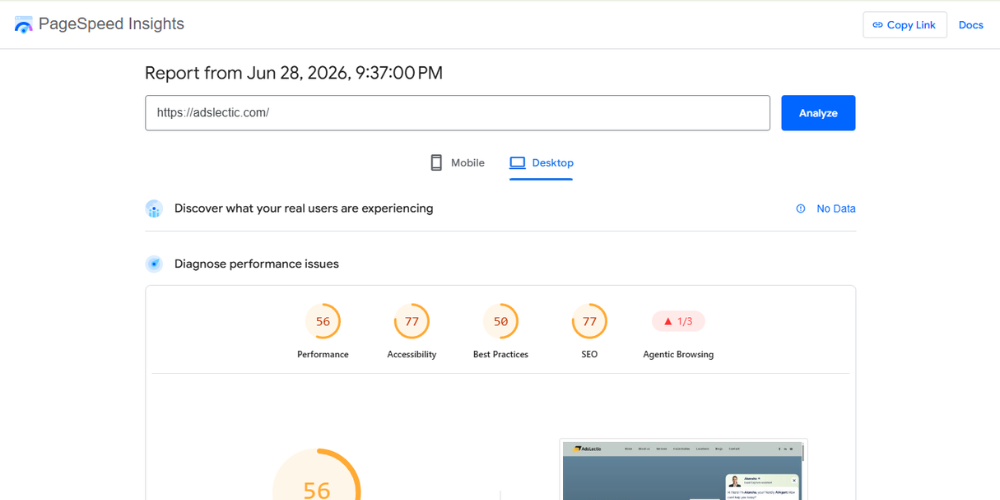
For any URL flagged in Google Search Console, run it through PageSpeed Insights to get URL-level diagnostics.
Review both mobile and desktop scores. Pay particular attention to:
- Opportunities: Specific, estimated improvement recommendations
- Diagnostics: Technical details about rendering, resource loading, and execution
- Field Data vs. Lab Data: Field data reflects real users; lab data is a simulated test
Always prioritize your highest-traffic pages — optimizing a page visited by 5,000 users per month delivers far more value than optimizing a page with 50 monthly visitors.
3. Improve Largest Contentful Paint (LCP)
LCP measures how fast the dominant visual element — typically a hero image, heading, or large text block — loads for real users.
Common causes of poor LCP:
- Large, uncompressed hero images
- Slow server response time (TTFB above 800ms)
- Render-blocking CSS and JavaScript in the
<head> - Heavy third-party scripts loading before page content
How to improve LCP:
- Convert images to WebP or AVIF format and compress aggressively
- Add
loading="eager"andfetchpriority="high"to your above-the-fold hero image - Preload critical CSS and fonts using
<link rel="preload"> - Use a Content Delivery Network (CDN) to reduce server response time
- Defer non-critical JavaScript using
deferorasyncattributes - Upgrade your hosting plan if TTFB consistently exceeds 800ms
4. Improve Interaction to Next Paint (INP)
INP measures how responsive your page is to user interactions throughout the entire page lifecycle — not just during initial load.
Common causes of poor INP:
- Heavy JavaScript executing on user interactions
- Long main-thread tasks blocking responsiveness
- Bloated plugins or third-party scripts competing for main-thread time
- Unnecessary event listeners attached to every element
How to improve INP:
- Break long JavaScript tasks into smaller, asynchronous chunks
- Defer or remove non-essential third-party scripts (chat widgets, analytics, ad trackers)
- Use web workers for computation-heavy tasks
- Audit your installed plugins and remove those not actively needed
5. Reduce Cumulative Layout Shift (CLS)
CLS measures unexpected visual instability as a page loads — elements jumping around as images, ads, or fonts load in. A high CLS score is one of the most disruptive experiences for users.
Common causes of poor CLS:
- Images without explicit
widthandheightattributes in HTML - Ads or embeds without reserved space
- Web fonts causing a flash of unstyled text (FOUT) that shifts layout
- Dynamic content injected above existing page content
How to fix:
- Always specify
widthandheighton every<img>tag - Reserve space for ad slots and embedded content using CSS aspect-ratio or min-height
- Use
font-display: optionalorfont-display: swapwith a preload for web fonts - Avoid inserting dynamic content above the fold after page load
6. Review Mobile Performance Separately
Google uses mobile-first indexing, meaning it primarily evaluates your website’s mobile version for ranking purposes. A site that performs well on desktop but poorly on mobile will underperform in organic search.
Mobile-specific checks:
- Responsive layout works correctly across all screen sizes
- Touch targets (buttons, links) are at least 48×48 pixels with adequate spacing
- Font size is at least 16px for body text to avoid requiring pinch-to-zoom
- No intrusive interstitials or pop-ups covering content on arrival
- Viewport meta tag is correctly configured:
<meta name="viewport" content="width=device-width, initial-scale=1">
Common Performance Issues
| Issue | Why It Matters | Recommended Fix |
|---|---|---|
| Slow LCP (above 2.5s) | Delayed page loading, poor user experience | Optimize images, compress, use CDN |
| Poor INP (above 200ms) | Sluggish page interactions | Reduce JavaScript execution time |
| High CLS (above 0.1) | Layout instability frustrates users | Reserve space for images, ads, and embeds |
| Large uncompressed images | Major contributor to slow LCP | Convert to WebP, compress, add dimensions |
| Render-blocking scripts | Delays when page starts to render | Defer or async non-critical JavaScript |
| Slow server response (TTFB) | Everything else is delayed | Upgrade hosting or implement a CDN |
Quick Core Web Vitals Checklist
✅ LCP is 2.5 seconds or less on both mobile and desktop
✅ INP is 200ms or less
✅ CLS score is 0.1 or less
✅ All images use WebP format, are compressed, and have explicit dimensions
✅ Non-critical JavaScript is deferred or loaded asynchronously
✅ Mobile performance passes Google’s mobile usability tests
✅ Google Search Console shows no pages in the “Poor” Core Web Vitals category
Step 5: Validate Structured Data and AI Search Readiness
Modern technical SEO extends well beyond helping search engines crawl and index your website. With the rapid rise of AI-powered search experiences — including Google’s AI Overviews and Bing’s AI-powered results — it is increasingly important to ensure your content is structured, credible, and easy for both search engines and AI systems to interpret and cite accurately.
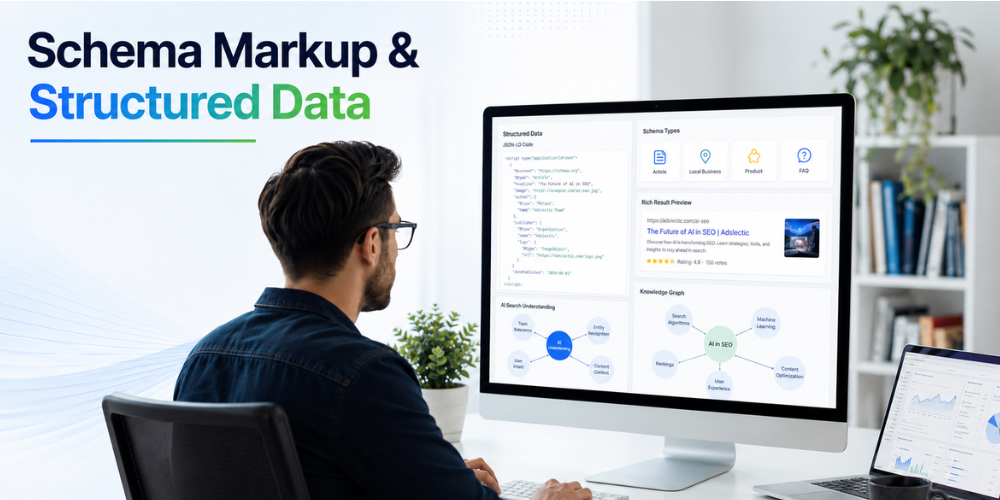
Structured data provides additional context about your content. Proper technical implementation improves your eligibility for rich results, enhances content discoverability, and positions your website to benefit from AI search visibility.
Why Structured Data Matters
Structured data (Schema.org markup) helps search engines understand the purpose and context of your content at a deeper level. Instead of simply crawling text and inferring meaning, search engines can identify exactly what a page contains:
- Articles and author information
- Products with price and availability
- FAQs and their structured answers
- Reviews and aggregate ratings
- Organization details and contact information
- Breadcrumb navigation paths
- Events, services, and local business details
This additional context increases your eligibility for rich snippets, knowledge panels, featured snippets, and enhanced AI-generated answers — all of which can dramatically improve how your pages appear in search results and increase click-through rates without requiring higher rankings.
Important: Structured data is not currently a direct ranking factor, but it can significantly improve how your pages appear in search results. Rich results with star ratings, FAQ dropdowns, or breadcrumb paths consistently outperform plain blue links in click-through rate.
How to Audit Structured Data
1. Test Your Schema Markup
Use Google’s Rich Results Test to verify that your structured data is correctly implemented and eligible for rich results.
Check whether your key pages implement relevant schema types:
- Article — for blog posts and editorial content
- Organization — for your homepage and About page
- BreadcrumbList — for all pages with breadcrumb navigation
- FAQ — for pages with question-and-answer sections
- Product — for every product page on an eCommerce site
- LocalBusiness — for any business serving a specific geographic area
- HowTo — for step-by-step guide content (like this very article)
Fix any errors before they affect your rich result eligibility, and address warnings where possible.
2. Review HTTPS Security
HTTPS is a confirmed Google ranking signal and a foundational trust requirement in 2026. Any website still accessible over HTTP is at a technical and competitive disadvantage.
Verify that:
- Your SSL certificate is active and not expired
- Visiting
http://yourdomain.comautomatically 301 redirects tohttps://yourdomain.com - No mixed content warnings exist (HTTPS pages loading HTTP resources)
- All internal links use HTTPS URLs
- All canonical tags reference HTTPS versions of URLs
An expired SSL certificate triggers browser security warnings that destroy user trust instantly — monitor your certificate expiry date and set a renewal reminder.
3. Check Mobile Usability
Since Google primarily uses mobile-first indexing, mobile usability issues directly affect your ability to rank well in search results.
Open Google Search Console → Experience → Mobile Usability and fix any reported errors.
Review:
- Responsive layouts across all major screen sizes
- Viewport meta tag correctly configured
- Font sizes readable without zooming
- Touch targets adequately sized and spaced
- No intrusive interstitials blocking content on mobile arrival
4. Improve Accessibility
Accessibility improvements benefit both users and search engines. Many accessibility best practices overlap with technical SEO best practices, making them doubly valuable.
Review:
- All images have descriptive, meaningful alt text
- Heading hierarchy is logical (H1 → H2 → H3, never skipping levels)
- Color contrast ratios meet accessibility standards
- All interactive elements are keyboard-navigable
- Link anchor text is descriptive, not generic (“read more” tells no one anything)
- ARIA labels are present on interactive components that lack visible labels
Screaming Frog can identify images missing alt text across your entire site. Export the report, prioritize images on your most-trafficked pages, and add descriptive alt text that accurately describes the image content.
5. Optimize for AI Search Readiness
AI-powered search systems — including Google’s AI Overviews and AI-powered answer engines — increasingly prioritize technically well-structured, authoritative, and trustworthy websites when generating responses.
While AI search optimization continues to evolve rapidly, the following best practices strengthen your technical foundation for both traditional and AI search:
- Publish well-structured content using a clear, logical heading hierarchy
- Maintain strong internal linking between related topics to demonstrate topical depth
- Use descriptive, accurate page titles and meta descriptions
- Implement structured data that helps AI systems understand your content’s context and credibility
- Ensure all content is crawlable and indexable — AI systems cannot cite content they cannot access
- Keep information accurate, up-to-date, and cited where appropriate
- Demonstrate genuine expertise through author credentials, experience-based content, and specific, actionable advice
- Build trust signals — About pages, contact information, editorial policies, and professional credentials
Related Reading: AI search is fundamentally changing how content is discovered and cited. Our guide on AI search trust signals explains exactly how technical SEO and content quality work together to improve your visibility in AI-powered search experiences — and what specific signals these systems use to determine which websites to trust and cite.
Common Structured Data and Technical Issues
| Issue | Why It Matters | Recommended Fix |
|---|---|---|
| Missing schema markup | Reduced eligibility for rich results | Implement relevant Schema.org markup via JSON-LD |
| Mixed content warnings | Security warnings undermine trust | Serve all resources over HTTPS |
| Mobile usability errors | Directly impacts mobile-first indexing | Fix responsive design issues |
| Missing image alt text | Accessibility and crawlability issues | Add descriptive alt text to all images |
| Invalid structured data | Search engines ignore the markup | Validate using Google’s Rich Results Test |
| Expired SSL certificate | Browser warnings destroy user trust | Monitor and renew SSL before expiry |
Quick Structured Data Checklist
✅ Schema markup validates without errors in Google’s Rich Results Test
✅ HTTPS is enabled across the entire website with no mixed content warnings
✅ Mobile usability issues have been resolved in Google Search Console
✅ All images include descriptive, accurate alt text
✅ BreadcrumbList schema is implemented on all relevant pages
✅ Author schema or Person schema is implemented on blog content
✅ Heading hierarchy is logical and consistent throughout the site
Common Technical SEO Mistakes to Avoid
Even experienced SEO professionals and developers can overlook technical issues that quietly suppress performance. Regular audits help catch these before they become serious problems.
| Mistake | Why It Hurts SEO | Recommended Solution |
|---|---|---|
| Blocking important pages in robots.txt | Google cannot discover valuable content | Review and test robots.txt after every change |
| Missing or outdated XML sitemap | Slower content discovery for new pages | Generate and resubmit an updated sitemap regularly |
| Broken internal links | Interrupts crawling and user navigation | Replace or redirect broken URLs immediately |
| Redirect chains | Wastes crawl budget and link equity | Always redirect directly to the final destination URL |
| Duplicate content without canonicalization | Confuses search engines, splits ranking signals | Use canonical tags or consolidate duplicate pages |
| Poor Core Web Vitals scores | Negative page experience signals | Optimize images, reduce JavaScript, improve server response |
| Incorrect canonical tags | Wrong pages get indexed | Review canonical implementation across all page types |
| Missing structured data | Missed rich result opportunities | Implement Schema.org markup via JSON-LD |
| Ignoring mobile usability | Reduced mobile-first indexing performance | Fix responsive design and mobile navigation issues |
| Performing audits only once | Technical issues accumulate silently over time | Schedule recurring quarterly audits |
Technical SEO Audit Checklist (Printable)
Use this checklist whenever you perform a website SEO audit. Print it, save it as a Google Sheet, or adapt it to your preferred project management tool.
Crawlability
✅ Review robots.txt and remove unnecessary Disallow rules
✅ Validate and resubmit XML sitemap in Google Search Console
✅ Fix all broken internal links (4XX responses)
✅ Identify and collapse redirect chains to direct redirects
✅ Add internal links to all orphan pages
✅ Confirm Google Search Console reports no critical crawl errors
Indexability
✅ Review the Pages → Indexing report in Google Search Console
✅ Verify canonical tags are correct on all important pages
✅ Remove unintended noindex directives from live pages
✅ Resolve duplicate content issues through canonicals or consolidation
✅ Inspect top-value URLs using the URL Inspection Tool
Website Structure
✅ Review URL structure for consistency and keyword relevance
✅ Confirm important pages are within 3 clicks of the homepage
✅ Strengthen internal linking with descriptive anchor text
✅ Implement and validate BreadcrumbList schema
✅ Test mobile navigation across multiple device sizes
Performance (Core Web Vitals)
✅ Test Core Web Vitals in Google Search Console and PageSpeed Insights
✅ Compress all images and convert to WebP/AVIF format
✅ Defer non-critical CSS and JavaScript
✅ Reserve dimensions for all images and media embeds
✅ Optimize server response time (TTFB under 800ms)
✅ Confirm no pages remain in “Poor” CWV status in Search Console
Structured Data and AI Readiness
✅ Validate schema markup using Google’s Rich Results Test
✅ Confirm HTTPS is enabled with no mixed content
✅ Resolve all mobile usability errors in Google Search Console
✅ Add descriptive alt text to all images
✅ Implement BreadcrumbList, Article, and Organization schema as applicable
✅ Maintain logical heading hierarchy (H1 → H2 → H3) throughout the site
✅ Keep content accurate, well-structured, and regularly updated
Frequently Asked Questions About Technical SEO Audits
A technical SEO audit focuses on your website’s technical health — crawlability, indexability, page speed, Core Web Vitals, structured data, and site architecture. A complete SEO audit extends further to evaluate keyword strategy, content quality, backlink profile, competitor analysis, and overall organic search performance. A technical audit should always come first — it creates the foundation that makes all other SEO work more effective.
Most websites benefit from a full technical SEO audit every quarter. Websites that publish content frequently, manage large product catalogs, or undergo regular structural updates should perform monthly technical health checks using Google Search Console. Always run a full audit immediately after a site migration, CMS change, or URL restructure.
Yes. Google Search Console, Google Analytics 4, Google PageSpeed Insights, Google Lighthouse, and the free version of Screaming Frog (up to 500 URLs) allow you to perform a thorough audit at zero cost. Paid tools like SEMrush and Ahrefs add automation, historical tracking, and deeper crawl capabilities — but the free tools are sufficient for most small to medium websites.
Work in this order: (1) Crawlability issues — anything blocking Google from discovering your pages. (2) Indexability issues — noindex tags, canonicals, duplicate content. (3) Core Web Vitals failures — especially pages in the “Poor” category. (4) Site structure and internal linking weaknesses. (5) Missing or invalid structured data. This sequence ensures you are resolving foundational issues before optimizing for enhanced performance.
It is arguably more important. eCommerce websites generate thousands of URLs from product variations, filters, and sorting parameters — creating significant duplicate content, crawl budget waste, and indexing issues at scale. Regular audits help eCommerce sites maintain clean index coverage, fast page speeds, and correct product schema — all of which directly impact revenue. For Shopify stores specifically, see our guide on the best Shopify SEO apps that can automate many of these technical checks within your store.
More important than ever. AI-powered search experiences depend on well-structured, crawlable, and technically trustworthy websites to generate accurate answers. A technically broken or poorly structured website is less likely to be discovered, crawled, or cited by AI search systems. Technical SEO is the foundation that determines whether your content is accessible to both traditional search engines and the AI systems now reshaping how information is found.
The fastest method: set up Google Search Console (free, takes five minutes) and check the Pages, Core Web Vitals, and Mobile Usability reports. For a deeper technical crawl, run Screaming Frog’s free tier against your most important pages and export the results. You will uncover the majority of critical technical issues without spending a rupee.
Conclusion
A successful SEO strategy begins with a technically healthy website. Without a strong technical foundation, even the best content and the most carefully earned backlinks will underperform against their potential.
By following this technical SEO audit checklist for 2026, you can systematically identify and fix hidden issues across crawlability, indexability, website structure, page performance, structured data, and AI search readiness. More importantly, you will build a website that search engines can efficiently access and understand — and one that delivers a fast, reliable, trustworthy experience to every visitor.
Remember that technical SEO is not a one-time project. Search engines evolve, websites change, new content gets published, and new technical issues can emerge at any time. Regular audits — quarterly at minimum — are what separate websites that maintain strong organic visibility from those that gradually lose ground to competitors who pay closer attention to their technical foundations.
If you are serious about improving your rankings, protecting your organic traffic, and preparing your website for the future of AI-powered search, make technical SEO audits a recurring, non-negotiable part of your overall strategy.
Found a specific technical SEO issue while working through this checklist? Connect with our AdsLectic team a digital marketing agency specializing in technical SEO, content strategy, and organic growth for businesses across India and internationally, our team will help you troubleshoot it.